
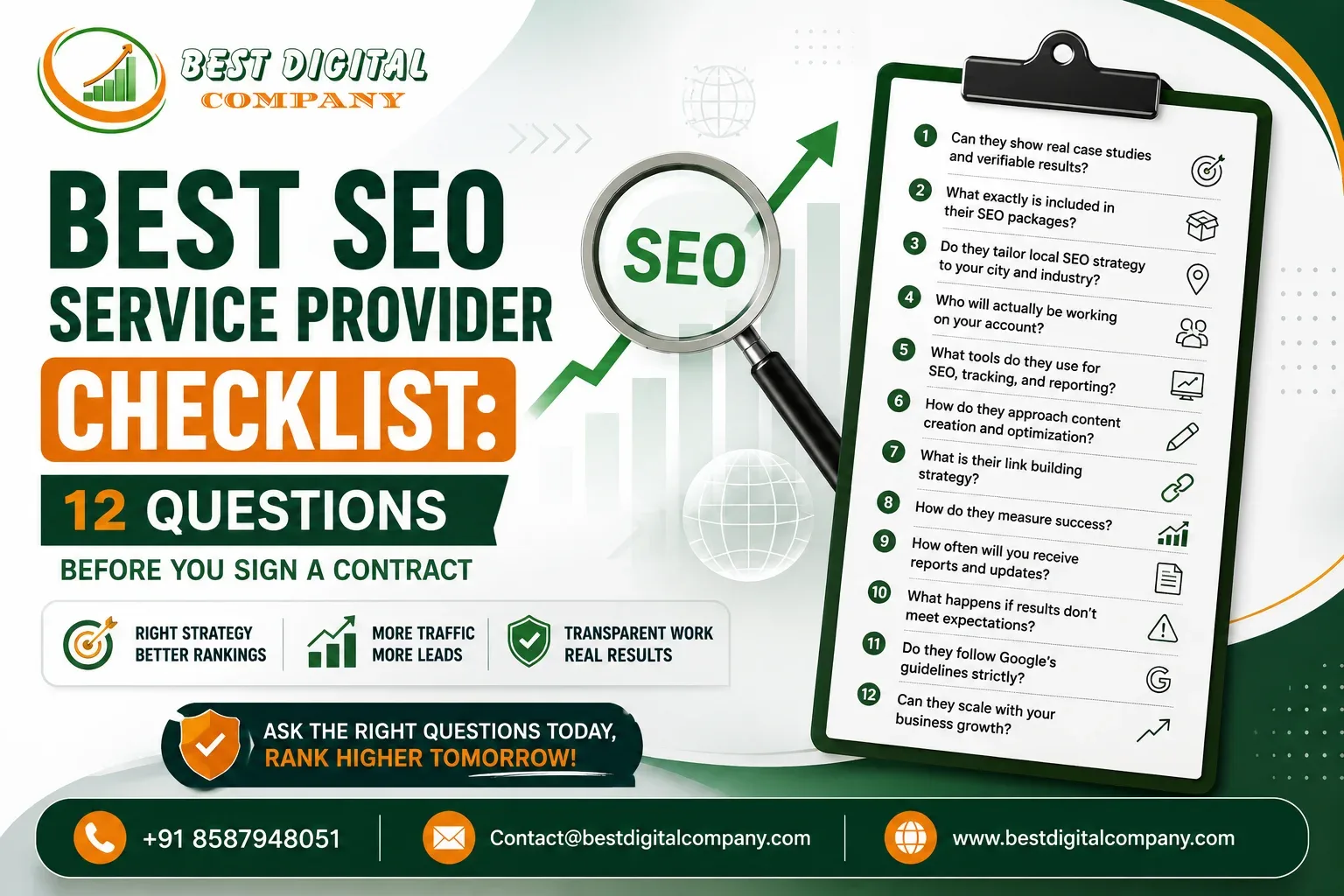
Best SEO Service Provider Checklist

Best SEO Service Provider Checklist: 12 Questions Before You Sign a Contract

If you have ever signed an SEO contract and then spent the next six months wondering what you actually paid for, you are not the only one. It happens more often than most agencies like to admit. A business owner sees a confident sales pitch, a nice-looking proposal with a few graphs, and a promise of “page one rankings,” and signs on the dotted line without asking the questions that actually matter.

The truth is, finding the best SEO service provider for your business is not about picking the agency with the flashiest website or the lowest monthly fee. It is about asking the right questions before any money changes hands  because once you are three months into a contract with a provider who cuts corners, walking away costs you time, money, and rankings you may never fully recover.

This checklist walks you through the 12 questions worth asking any SEO agency or freelancer before you commit. Whether you are comparing a handful of quotes or just met a provider who seems promising, these questions will tell you almost everything you need to know about how they actually work.

Why Choosing the Best SEO Service Provider Matters More Than Ever

Search engines have gotten a lot better at telling the difference between genuine expertise and content churned out to game rankings. Sites that once ranked on volume alone are losing ground to competitors who invest in real research, original insight, and pages built around what searchers actually want to know. That shift changes what “good SEO” looks like in practice.

It also means the gap between an average provider and a genuinely capable one has widened. An agency using outdated tactics  keyword stuffing, low-quality backlinks, thin content  is not just wasting your budget. It can actively hold your site back or, in worse cases, get it penalized. That’s why the vetting process matters so much before you sign anything.

1. Can They Show Real Case Studies and Verifiable Results?

Ask for specifics. Not a generic slide with a rising graph, but an actual client example: what the website looked like before, what work was done, and where the traffic or rankings stand today. A provider confident in their work will happily share this, sometimes even connecting you with a past or current client for a quick reference call.

Be cautious of agencies that only show screenshots of ranking positions without any context on the client’s industry, competition level, or timeline. Rankings without context don’t tell you much. Ask instead: “What was the organic traffic before you started, and what is it now, over what period?” A provider offering genuine search engine optimization services should be able to answer this in one sentence, not a dodge.

2. What Exactly Is Included in Their SEO Packages?

This is where a lot of confusion starts. Two agencies can both say “we offer SEO for ₹25,000 a month,” yet one is doing in-depth technical audits, content strategy, and link building, while the other is running an automated tool and calling it a day.

Before you compare prices, get an itemized breakdown of what’s actually delivered each month: how many hours of work, how many pages optimized, how much original content produced, what technical fixes are covered, and how link building is approached. If you are evaluating multiple providers, it helps to understand the difference between paying for a defined scope of work versus a fixed monthly package — we covered this distinction in more detail in our post on SEO services vs SEO packages, which is worth a read if pricing structures feel confusing right now.

3. Do They Tailor Local SEO Strategy to Your City and Industry?

If most of your customers come from a specific city or region, generic national SEO advice won’t cut it. A provider who understands local SEO will ask about your service areas, set up and optimize your Google Business Profile properly, build location-specific pages, and target searches with local intent — the kind someone types in when they are ready to buy nearby, not just browsing.

Ask directly: “How would you approach my local visibility if most of my customers are searching for a business near them?” A provider offering dedicated local SEO services in Delhi, or similar city-specific SEO for your region, should walk you through citations, review strategy, and localized content without hesitation.

4. Who Will Actually Be Working on Your Account?

This question trips up more business owners than any other. The person who pitches you in the sales meeting is often not the person doing the actual work. Ask who will be assigned to your account, what their experience level is, and how much time they’ll realistically spend on your website each month.

It is also fair to ask whether any part of the work — content writing, link outreach, technical audits — gets outsourced to a third party. There is nothing wrong with a well-managed subcontracting model, but you deserve to know who is touching your website and what quality checks are in place before anything goes live.

5. What Tools and Reporting Do They Use for Transparency?

A provider that can’t show you where your traffic, rankings, and conversions currently stand is not giving you SEO — they are giving you guesswork. Ask which tools they use for tracking (Google Search Console and Google Analytics should be non-negotiable baseline access, along with a paid tool for keyword tracking and audits).

More importantly, ask how often you’ll receive reports and what those reports actually contain. A monthly PDF with vague statements like “improved visibility” isn’t useful. You want specific numbers: keyword position changes, organic traffic trends, pages published, technical issues fixed, and a clear explanation connecting the work done to the results seen.

6. Do They Follow Ethical, Search-Engine-Approved Techniques?

This is arguably the most important question on this list, because the wrong answer here can hurt your website for years. Ask the provider directly how they approach link building. If the answer involves buying links in bulk, using private blog networks, or guaranteeing a specific number of backlinks per week regardless of quality, that’s a warning sign.

Similarly, ask about their content approach. Do they write for search engines or for actual readers? A trustworthy provider will talk about relevance, search intent, and building topical authority not “keyword density” or “stuffing.” If you’ve ever compared how a full-service agency talks about strategy versus how a smaller outfit sells packages, our earlier piece on SEO agency vs SEO company breaks down how these conversations tend to differ in practice.

7. How Do They Approach Content Strategy and Quality?

Content is where a lot of budgets quietly disappear. Ask how the provider researches topics, who writes the content, and how they ensure it’s original rather than recycled from competitor pages with a few words swapped. Ask, too, whether they involve subject-matter input from your team  because a generic article written with no knowledge of your actual business rarely performs well or builds trust with your audience.

A capable provider should describe a process: keyword and intent research, an outline built around what a real reader needs, a draft written by someone with actual subject familiarity, and a review step before publishing. If they can’t describe this process in plain terms, that is a gap worth noting.

8. What’s Their Approach to Technical SEO and Website Health?

Content and links matter, but none of it works well on a site that’s slow, poorly structured, or riddled with broken pages. Ask how they handle technical audits: site speed, mobile usability, indexing issues, structured data, duplicate content, and broken internal links.

It is also worth asking whether they ever recommend removing or consolidating old, underperforming pages rather than just adding new ones endlessly. This is a more advanced but increasingly important practice, we explained why trimming a bloated site can actually improve overall performance in our article on content pruning and its effect on SEO. A provider aware of this shows they are thinking about your site holistically, not just adding volume.

9. Can They Align SEO with Other Channels Like PPC and Social Media?

SEO rarely works in isolation anymore. If your provider also understands how paid search and social channels fit into the bigger picture, campaigns tend to reinforce each other rather than compete for the same budget and attention. Ask whether they offer, or can coordinate with, PPC advertising services or social media marketing, and how they’d use data from one channel to inform the other.

For example, paid search data can reveal which keywords convert best, informing which organic terms to prioritize. If you are curious what a well-run paid campaign actually involves month to month, our breakdown of what a performance marketing agency does for PPC is a useful companion read here.

10. What Does Their Contract Length, Pricing, and Exit Process Look Like?

Read the contract terms carefully, not just the price. Ask about the minimum commitment period, what happens if you want to cancel, and whether you retain ownership of the content, backlinks, and any accounts set up on your behalf (like Google Business Profile or Search Console access).

Be wary of providers who lock you into a long-term contract with vague deliverables and no clear exit clause. A confident provider won’t need to trap you in a contract to keep your business their results should be the reason you stay.

11. How Do They Handle Website Redesigns or New Site Migrations Alongside SEO?

If you are planning a website redesign or you are currently juggling both a new site build and SEO, ask how the provider coordinates the two. A site migration done without SEO oversight can wipe out years of rankings overnight through broken redirects, lost metadata, or restructured URLs.

Ask specifically: “If I need a new website built, do you handle that in-house, and how do you make sure SEO is not disrupted during the transition?” If they also offer website development and design, find out how their design and SEO teams actually talk to each other during a project — this coordination matters more than most business owners realize until something breaks. Our guide on what’s included in website development services is a useful reference if you’re weighing a redesign alongside your SEO plans.

12. What Does Ongoing Communication and Reporting Actually Look Like?

Finally, ask what a normal month of communication looks like once the contract is signed. Will you have a dedicated point of contact? Is there a monthly call to walk through results, or do reports just land in your inbox with no explanation? How quickly do they respond if you have an urgent question or notice something odd on your website?

This question often reveals more about a provider’s culture than any of the technical questions above. Providers who treat communication as an afterthought after the sale usually treat the actual work the same way.

Putting the Checklist Into Practice

Going through all 12 questions with two or three providers before you decide takes an extra week, maybe two. That small delay is nothing compared to months lost to a provider who wasn’t equipped to deliver. When you find a best SEO service provider who answers these questions clearly, backs claims with real data, and explains their process in plain language rather than jargon, you have likely found a partner worth signing with.

If you are currently comparing quotes and want a second opinion on a proposal you have received, or you’d like a straightforward audit of where your website currently stands, our team is happy to walk through it with you no pressure, just a clear picture of where things are today and what realistic improvement looks like.


FAQ: Best SEO Service Provider

How do I know if an SEO provider is genuinely good versus just good at sales?

Ask for verifiable, specific results tied to a timeline, request a client reference, and pay close attention to how clearly they explain their process. Vague answers about “boosting visibility” without numbers or methodology are usually a sign the substance is not there.

How much should I expect to pay the best SEO service provider for my business?

Pricing varies widely based on your industry, competition, and the scope of work involved. A small local business needs a very different investment than a national e-commerce brand. What matters more than the number itself is getting an itemized breakdown of what that price actually includes each month.

How long does it typically take to see results from SEO?

Most reputable providers will tell you that meaningful, sustainable results usually take three to six months, with continued growth over the following months. Anyone promising page-one rankings within days or weeks is either overpromising or using shortcuts that risk long-term penalties.

Should I choose a provider that only does SEO, or one offering multiple services?

Both approaches can work well. A specialist may bring deeper technical expertise, while a full-service provider can align SEO with paid ads, social media, and web design under one roof, which often makes coordination easier. The right choice depends on your current setup and how much internal coordination you’re able to manage yourself.

What is a reasonable contract length for SEO services?

Month-to-month or short-term agreements (three to six months) with clear performance check-ins are generally healthier than long, rigid annual contracts, especially early in a relationship with a new provider. This gives both sides room to evaluate fit before committing longer term.

Can I switch SEO providers without losing my rankings?

Yes, in most cases, as long as the transition is handled carefully. Make sure you retain full access to your Google Search Console, Analytics, and Google Business Profile accounts, and get a full record of any work already done backlinks built, content published, and technical changes made, so your new provider can pick up smoothly.

Website Redesign Checklist: 15 Steps to Follow

Website Redesign Checklist: What to Fix Before You Break Your Rankings

Every few months, a business owner writes to us with the same nervous question: “We are redesigning our website. Should we be worried about losing our Google traffic?” The honest answer is yes, if the redesign is handled carelessly. We have seen brands lose sixty to seventy percent of their organic traffic in a single week because someone changed the URL structure without setting up redirects, or removed old content because it “looked outdated” without checking which pages were actually bringing in leads.

A redesign is not just a visual refresh. It touches your site structure, your page speed, your on-page SEO, your tracking setup, and sometimes your entire content library. If even one of these pieces is handled without a plan, the new website can look better and perform worse at the same time.

This checklist walks through everything we personally verify before, during, and after a redesign project, whether we are rebuilding a five-page business site or restructuring a hundred-page e-commerce store.

Why Website Redesigns Go Wrong So Often

Most redesign failures don’t come from bad design. They come from treating the redesign as a design-only project when it is really a design, development, and SEO project rolled into one.

A typical failure pattern looks like this: the design team builds a beautiful new site in a staging environment. The development team migrates it live on a Friday evening to “avoid disruption.” Nobody exports the old URL list. Nobody checks which pages had backlinks. Nobody sets up redirects. By Monday, Google is returning 404 errors for pages that used to rank on page one, and the client is asking why calls have stopped coming in.

None of this is unusual. It is, in fact, the default outcome unless someone owns the technical and search side of the migration from day one. That is usually where an agency offering full-stack search engine optimization support earns its keep, because the person managing rankings needs to be involved before the new site goes live, not after traffic drops.

Pre-Redesign Audit: Know What You’re Replacing

Before a single new page is designed, you need a complete record of what already exists. Skipping this step is the single biggest reason redesigns backfire.

Export Your Full URL List

Crawl your existing site with a tool like Screaming Frog or Sitebulb and export every indexed URL. This becomes your master checklist for the migration. You will use it later to map old URLs to new ones and to confirm nothing gets orphaned.

Identify Your Top-Performing Pages

Pull your last twelve months of data from Search Console and analytics. Note which pages bring in the most organic clicks, which ones convert visitors into leads, and which ones carry the most backlinks. These pages need special handling during the rebuild; their content, headings, and URLs should not be touched carelessly, and if the URL must change, a redirect is non-negotiable.

Audit Existing Content Quality

Not every old page deserves to survive the redesign. Some pages are thin, outdated, or were written years ago in a way that no longer matches how people actually search today. This is a good moment to decide what gets kept, what gets merged, and what gets retired with a redirect to a more relevant page. We covered this kind of structural cleanup in our piece on internal linking strategy, since a redesign is often the perfect time to fix link equity that has been leaking for years.

Document Current Technical Setup

Record your current page speed scores, your XML sitemap location, your robots.txt rules, your schema markup, and your analytics and tag manager setup. All of this needs to be recreated, and often improved, on the new site.

Planning the New Site Structure

Once you know what you’re working with, the next step is deciding what the new site should look like structurally, not visually.

Map Old URLs to New URLs

This is the step people skip and regret the most. Every existing URL that will change needs a corresponding 301 redirect mapped to its closest equivalent on the new site. A spreadsheet with two columns, old URL and new URL, should exist before development starts, not after launch.

Keep URL Structure Simple and Logical

If you’re rebuilding your site around your service offerings, this is a good time to make sure each core service has its own clean, dedicated URL rather than being buried under a generic “services” page. A business offering location-based services, for instance, benefits from a clear structure where a page like SEO Services in Mumbai sits on its own dedicated URL instead of a paragraph inside a broader page.

Plan Your Navigation Around User Intent

Your main menu should reflect what visitors are actually trying to do on your site, not how your internal teams are organized. Group services logically, keep the menu shallow, and make sure your most important pages are reachable within two clicks from the homepage.

Decide on CMS and Hosting Early

If you’re switching content management systems or hosting providers as part of the redesign, this decision affects almost everything downstream, from how redirects are implemented to how fast pages load. Make this decision before design work begins, not during development.

On-Page SEO: What Must Carry Over

A new design should never mean starting your on-page optimization from zero. Everything that was working needs to be preserved or improved.

Title Tags and Meta Descriptions

Every page needs a unique title tag and meta description that reflects what the page is actually about. If a page was previously ranking well for a specific search term, keep that intent front and center in the new title rather than replacing it with generic branded copy.

Heading Structure

Each page should have one clear H1 that states the page’s purpose, followed by a logical H2 and H3 structure underneath. Designers sometimes remove headings in favor of stylized text blocks that look nice but carry no semantic structure. This is a common redesign mistake that quietly damages how search engines understand the page.

Internal Linking Between Services and Blog Content

A redesign is the ideal moment to fix internal linking gaps. If your business serves multiple regions, each regional page should link to related service pages and relevant blog content, and vice versa. For example, a business targeting SEO Services in Punjab should have that page linked from relevant blog posts about regional search strategy, and that page in turn should link back to supporting content like your guide onlaunching a new website. Search engines use these internal pathways to understand which pages matter most on your site, and visitors use them to find related information without leaving.

Image Alt Text and File Names

Every image uploaded during the redesign should have a descriptive file name and alt text. This matters both for accessibility and for how search engines interpret page content, and it is one of the easiest things to overlook when a design team is focused purely on visual polish.

Schema Markup

Structured data for your organization, services, reviews, and FAQs should be rebuilt and tested on the new site. If your old site had schema that was helping you appear with rich results, losing that during a redesign is a completely avoidable step backward.

Technical Foundations You Cannot Skip

Design and content matter, but the technical layer decides whether any of it gets seen at all.

Mobile Responsiveness

Test every template on actual phones, not just a browser’s device emulator. Check that buttons are tappable, forms are usable, and text doesn’t require zooming. A large share of traffic today arrives on mobile devices, and a design that only looks good on a desktop monitor is an incomplete design.

Page Speed and Core Web Vitals

Compress images before upload, minimize unnecessary scripts, and avoid heavy animation libraries that slow down first paint. Run the new site through PageSpeed Insights before launch, not after, so problems get caught while developers are still actively working on the build.

SSL and Security

Confirm the new site runs on HTTPS from day one, and that mixed content warnings from old HTTP resources have been cleaned up. This is a basic requirement, but it still gets missed on rushed migrations.

XML Sitemap and Robots.txt

Generate a new sitemap that reflects your final URL structure and submit it in Search Console once the site goes live. Double-check robots.txt so that staging-only rules, like blocking the entire site from being crawled, don’t accidentally carry over to production. This single mistake, a leftover “disallow all” rule, has taken down more redesigned sites overnight than almost any other technical error.

404 Handling and Broken Link Checks

Crawl the new site after launch to catch broken internal links, missing images, and pages returning errors. Fix these within days, not weeks, since search engines re-crawl frequently and repeated errors can affect how much of your site gets indexed.

Content Strategy During a Redesign

Redesigns often become an excuse to rewrite everything at once, which is riskier than it sounds.

Don’t Rewrite Everything at Once

If a page is already ranking and converting, resist the urge to rewrite it purely because it doesn’t match the new visual template. Update the layout and design, but preserve the core content, headings, and messaging that were working. Content and design are separate problems, and treating them as one often leads to rewriting away the exact things that were driving results.

Fill Content Gaps Identified in the Audit

Use the audit phase to identify topics your competitors cover that you don’t. A redesign is a natural point to add new service pages, expanded FAQs, or supporting blog content that fills these gaps, rather than treating the new design as purely cosmetic.

Keep a Consistent Publishing Voice

If multiple people are writing new page copy during the redesign, make sure the tone stays consistent across the site. A visitor moving from your homepage to a service page to a blog post should feel like they’re reading content from the same team, not a patchwork of different writers with different styles.

Tracking, Analytics, and Post-Launch Monitoring

The work isn’t done when the new site goes live. The first thirty days after launch decide whether the redesign was a success or a setback.

Reinstall and Verify Analytics

Confirm Google Analytics, Search Console, and any conversion tracking scripts are correctly installed on the new site before it goes live, and test that form submissions, calls, and other conversion events are firing properly. It’s common for tracking codes to get lost during a platform migration, leaving you blind to performance for weeks.

Monitor Search Console Daily for the First Two Weeks

Watch for crawl errors, sudden drops in indexed pages, or unexpected changes in click-through data. Catching a problem on day two is far easier to fix than catching it on day twenty, after rankings have already started slipping.

Compare Before and After Performance

Set a baseline using your pre-redesign data and compare it against the same period post-launch. Traffic dips of a few percentage points during the transition are normal and usually recover. Sudden, sharp drops usually point to a technical issue, most often a redirect mapping mistake or an indexing block that needs immediate attention.

Keep Redirects in Place Long-Term

301 redirects from old URLs should stay active for at least a year, ideally longer, since backlinks and bookmarks from external sites can point to old URLs indefinitely. Removing redirects too early can quietly cut off traffic and link equity that took years to build.

Bringing Design and SEO Teams Together

The single most useful thing you can do during a redesign is make sure your design agency and your search strategy team are talking to each other from the very first planning meeting, not exchanging files after the fact. Many businesses hire a design-first agency without any structured plan for preserving rankings, and by the time an SEO specialist gets involved, the damage from missing redirects or stripped-out content is already done.

If your business serves specific regions, this coordination matters even more. A company relying on visibility through pages like SEO Services in Haryana needs those regional pages carried through the redesign with their structure, internal links, and local relevance intact, not rebuilt from scratch as an afterthought. The same applies to any business that depends on paid channels alongside organic search; a redesign that changes landing page URLs without updating campaign links can quietly break paid traffic tracking through your PPC campaigns at the exact same time your organic rankings are being tested.

A Simplified Redesign Checklist

To bring everything together, here is the condensed version we actually walk through with clients before any redesign project begins:

  • Export a full list of current URLs and their performance data
  • Identify top-performing pages that need special protection during migration
  • Audit existing content and decide what to keep, merge, or retire
  • Map every old URL to its new equivalent with 301 redirects
  • Plan a simple, logical URL and navigation structure
  • Preserve and improve title tags, meta descriptions, and heading structure
  • Rebuild internal links between service pages and blog content
  • Add descriptive alt text to every image
  • Test mobile responsiveness on real devices
  • Check page speed and Core Web Vitals before launch
  • Confirm SSL is active and there’s no mixed content
  • Generate a new XML sitemap and check robots.txt carefully
  • Reinstall and test all analytics and conversion tracking
  • Monitor Search Console daily for the first two weeks post-launch
  • Keep redirects active long-term, not just for a few weeks

Frequently Asked Questions

How long does a typical website redesign take?

This depends heavily on site size, but a small business site usually takes four to eight weeks from planning to launch, while larger sites with dozens of pages can take two to four months, especially if content needs to be rewritten or restructured alongside the visual redesign.

Will my rankings definitely drop after a redesign?

Not necessarily. A short-term fluctuation of a few days to a few weeks is common as search engines re-crawl and re-index the new site, but a well-planned redesign with proper redirects and preserved content should not cause a lasting drop. Significant, sustained drops almost always point to a technical mistake rather than an unavoidable side effect.

Do I need to redirect every single old URL?

Yes, every URL that changes needs a redirect, even ones you think don’t get much traffic. Old pages can still hold backlinks, bookmarks, or indexed positions that you’re not actively monitoring, and a missing redirect turns into a dead end for both users and search engines.

Should I rewrite all my content during a redesign?

Only where it’s actually needed. If a page is ranking well and converting visitors, changing its visual template is enough; rewriting the content at the same time introduces unnecessary risk. Save full rewrites for pages that were already underperforming or outdated.

What’s the biggest mistake businesses make during a redesign?

Treating it purely as a design project and involving search strategy only after the new site is already built. By that point, structural decisions that affect rankings, like URL structure and redirects, have already been made and are expensive to undo.

Can I redesign my site without losing my Google reviews and local listings?

Yes, but this needs to be planned. Google Business Profile listings, schema markup for reviews, and NAP (name, address, phone) consistency across directories should be checked after launch to confirm nothing broke during the technical migration.

Final Thought

A website redesign is one of the few projects where good design and good search strategy have to move in lockstep. Get the visuals right but ignore the technical and SEO side, and you’ll end up with a beautiful site that nobody can find. Get the checklist above right, and you get both: a modern site that represents your brand well, and one that keeps doing the quiet work of bringing in traffic and leads while you focus on running the business.